'/%3E%3Cpath%20fill='%23b2b2b2'%20d='M241%20382q0%2016%2017%2026%2017%2011%2042%2011t42-11q16-11%2017-26V269H241'/%3E%3Cpath%20fill='%239f7e00'%20d='M241%20379q0%2014%208%2023%209%209%2021%209%2014%200%2021-9%209-9%209-23V269h-59'/%3E%3Cpath%20d='M241%20339v-70h59v110q0%2014-9%2023l-6%205v-68h-15v72q-8%200-14-4v-68zm59%2040c0%2022%2015%2032%2029%2032%2021%200%2030-18%2030-32v-40h-59'/%3E%3Cpath%20fill='%239f7e00'%20d='M266%20277v5h2v12h-3v-5h2v-5h-9v5h2v5h-4v9h3v18h-5v10h34v-10h-5v-18h3v-9h-4v-5h2v-5h-9v5h2v5h-3v-12h2v-5zm42%20101q0%2010%206%2017%206%206%2015%207%2010-1%2016-7%206-7%206-17v-29h-43'/%3E%3Ccircle%20fill='%230044ad'%20cx='329.5'%20cy='372'%20r='6'/%3E%3Cellipse%20fill='%230044ad'%20cx='300'%20cy='340'%20rx='16'%20ry='21'/%3E%3C/svg%3E)

PD9200 ACCESS CARD SETUP
SETUP YOUR ACCESS CARDS
Fill out the form below for each access card you want configured, 1-5 cards and press the SEND CARDS button at the bottom of this page.
If you have any questions or comments, please do not hesitate to contact us at salesdepartment@proces-data.com
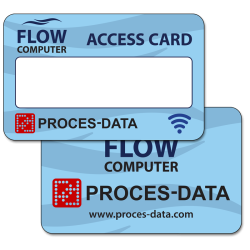
HOW TO SETUP YOUR ACCESS CARDS
At least one card per Flow Computer system must be configured as an Administrator card.
It is highly recommended to configure at least two administrator cards and store one as a backup in a secure location. Additional NFC cards may be purchased if required.
Not all cards must be configured. Unused cards may remain unconfigured and blank. Additional access cards can be configured at a later stage.
Cards without data will be delivered together with the system in an unconfigured state.
COMPANY
Company name.
YOUR NAME
Name
YOUR E-MAIL
User e-mail address.
CARDS 1-5
USER NAME
Card user name (max. 26 characters).
PASSWORD
Password for user name (max. 26 characters).
MOBILE PHONE
User mobile phone number (excluding country code).
Most be a mobile phone.
USER ID
Optional identifier used to define user ranges (e.g. administrators (user ID 1-10), drivers (user ID 50-75), standard users (etc)).
User ID selection is optional.
GROUP NAME
Groups enable access rights across multiple systems. A group is created on one Flow Computer and imported into one or more additional systems. Users assigned to a group will automatically gain access to all systems where the group is defined.
LANGUAGE
Six languages are currently available.
USER ROLES
One of six predefined roles can be assigned to each user. Roles define access rights and permitted functions while restricting unauthorized system operations:
1. Normal operation Access to start and stop automatic processes. Access to restart alarms.
2. Advanced operation Access to operate the plant in manual mode (Disabled, Manual_feedback).
3. Process specific data access Access to modify recipes, material data, pasteurizing temperature, dosing toler-ances etc.
4. Plant specific data access Access to modify configuration values – such as PID parameters, timeouts etc. and add new operators.
5. Service Access to replace devices and perform restore/download of programs and data (data to restore comes from the latest automatically generated backup set). Access to operate `Service-screen´ for hardware interfaces.
6. Certification Access to calibrate/adjust measurement equipment etc. (partial access to `Service-screens´).